


Question:
How can I bulk edit index entries in DocuWare instead of individually editing each document?
Answer:
DocuWare offers the functionality to change index entries for all documents stored in your DocuWare system.
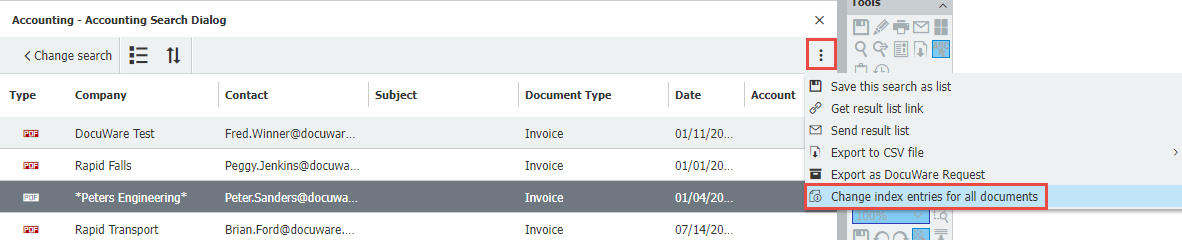
After performing a search in DocuWare, click on the ellipsis on the top-right corner of the result list to open the Options menu. From the dropdown, select the Change all index entries for all documents option. Upon selecting this option, you will be taken through the following steps to edit the index entries for all documents in bulk.
How can I bulk edit index entries in DocuWare instead of individually editing each document?
Answer:
DocuWare offers the functionality to change index entries for all documents stored in your DocuWare system.
After performing a search in DocuWare, click on the ellipsis on the top-right corner of the result list to open the Options menu. From the dropdown, select the Change all index entries for all documents option. Upon selecting this option, you will be taken through the following steps to edit the index entries for all documents in bulk.
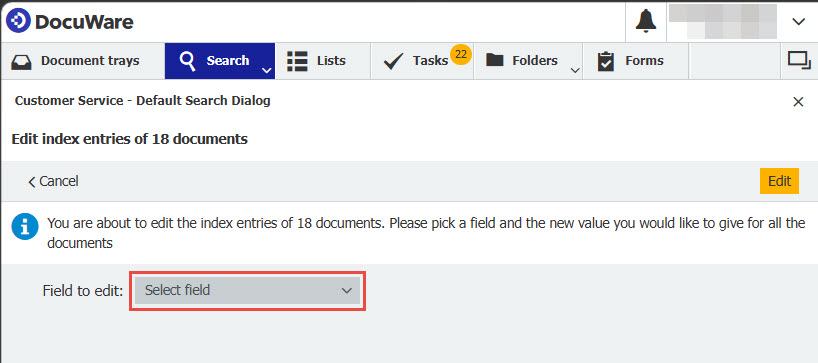
Select the index field you would like to edit in bulk, then add the change you want to make.
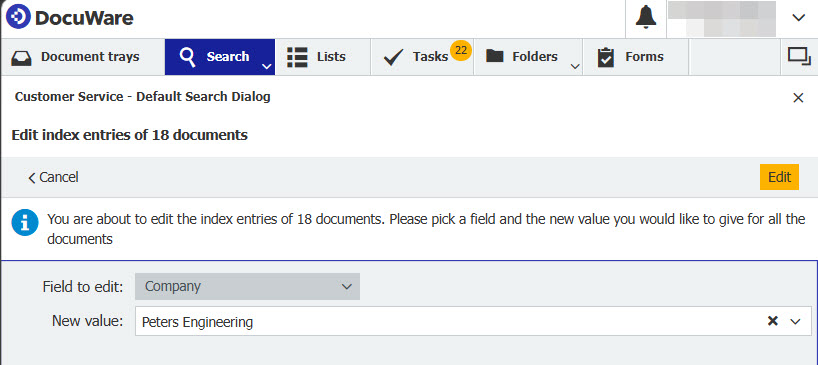
After confirming your edit, select the edit button to save your changes.
KBA is applicable to both Cloud & On-premise Organizations.