


Question:
How do I set timeouts for Database Connections and Commands?
Answer:
Database connection settings are contained in the DocuWare.DAL.dll.config file. (DAL = Data Access Layer). There are separate copies of this file for the DocuWare Server and other components (e.g., DocuWare Local Data Connector). Please refer to the following guide for an overview of locations where the DocuWare.DAL.dll.config file can be found in DocuWare version 7.14 and higher.
Locate the Configuration File:
Following the file path C:\Program Files\DocuWare, you will find and modify the DocuWare.DAL.dll.config files for the Background Process Server, Web Settings, Web Processes, Web Platform, etc.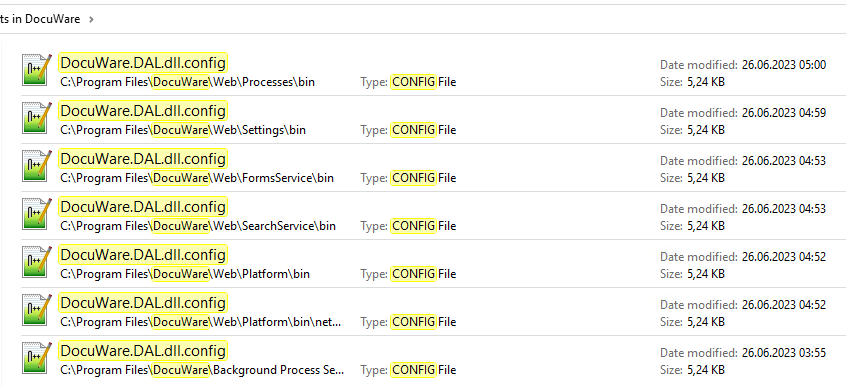
Timeout for Connections and Commands:
Within the DAL files there are three kinds of timeout values. These commands take longer than regular commands because the size of the tables involved determines their runtime. If necessary, you can adjust the values, all of which are in seconds.
Modifying Timeout Values within DocuWare.DAL.dll.config:
Refer to the following lines when reviewing the DocuWare.DAL.dll.config file. The commented line in the configuration file contains all available default parameters. Copy the timeout parameters you need to modify to the active <dataSettings> line.
Before (Default Settings):
<?xml version="1.0" encoding="utf-8" ?>
<!--<dataSettings LikeIgnoreCase="true" AutoTempTableListSize="200" LongCommandTimeout="600" UseAutoParameters="true" Pooling="True" MaxPoolSize="-1" ConnectionTimeout="30" ConnectionLifetime="-1" CommandTimeout="120" MaxBulkInserts="500" AutoParamGuidConversion="None ToLowerCase ToUpperCase" TimeBetweenDeadlockRetries="50" NumOfDeadLockRetries="5">-->
<dataSettings AutoTempTableListSize="200" LongCommandTimeout="1800" UsePerformanceCounters="true" UseAutoParameters="true">
<dataProviders>
Line two contains all default values. Those values can be copied and applied to the next line that begins with <dataSettings>. In the example below, the default values ConnectionTimeout and CommandTimeout have now been set to 60 and 240 seconds, respectively.
After (Modified Example):
<?xml version="1.0" encoding="utf-8" ?>
<!--<dataSettings LikeIgnoreCase="true" AutoTempTableListSize="200" LongCommandTimeout="600" UseAutoParameters="true" Pooling="True" MaxPoolSize="-1" ConnectionTimeout="30" ConnectionLifetime="-1" CommandTimeout="120" MaxBulkInserts="500" AutoParamGuidConversion="None ToLowerCase ToUpperCase" TimeBetweenDeadlockRetries="50" NumOfDeadLockRetries="5">-->
<dataSettings AutoTempTableListSize="200" LongCommandTimeout="1800" UsePerformanceCounters="true" UseAutoParameters="true" ConnectionTimeout="60" CommandTimeout="240" >
<dataProviders>

After you modify the file, save it and restart DocuWare Services and App Pools.
KBA is applicable to On-premise Organizations ONLY!