


Question:
What is the Desktop Apps SettingsPath, and where can it be changed?
Answer:
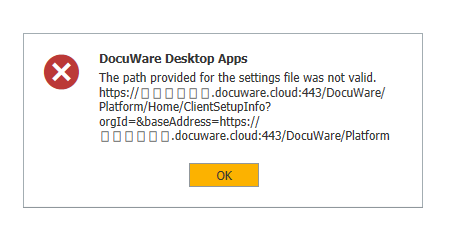
The SettingsPath is the URL that Desktop Apps uses when connecting to DocuWare to create a default desktop apps connection and to install, update, or uninstall desktop apps. If this value is incorrect, the following errors may occur when completing these tasks:
What is the Desktop Apps SettingsPath, and where can it be changed?
Answer:
The SettingsPath is the URL that Desktop Apps uses when connecting to DocuWare to create a default desktop apps connection and to install, update, or uninstall desktop apps. If this value is incorrect, the following errors may occur when completing these tasks:
"Creating or updating default connection failed."

"The path provided for the settings file was not valid."
The SettingsPath is set in the registry at the following location: Computer\HKEY_LOCAL_MACHINE\SOFTWARE\WOW6432Node\DocuWare\Setup
"The path provided for the settings file was not valid."
The SettingsPath is set in the registry at the following location: Computer\HKEY_LOCAL_MACHINE\SOFTWARE\WOW6432Node\DocuWare\Setup
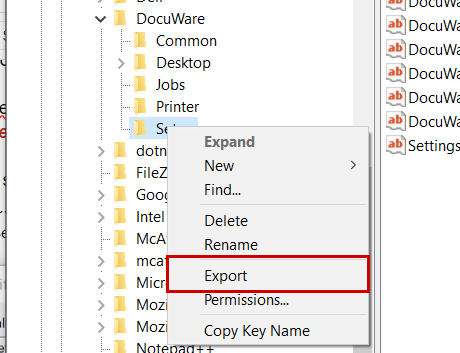
***Note: Before making any changes, please right-click the setup folder and click export to save a backup of your existing registry keys.***
There should be a value for SettingsPath saved already. Right-click this value and click modify to make any necessary changes to the URL.
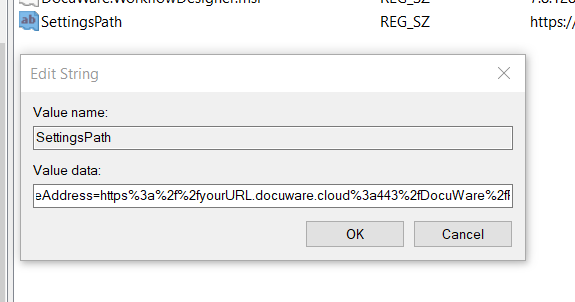
Here is a basic template of how this URL should be formatted. Please replace YOUR_DOCUWARE_URL with your own URL:
Cloud:
https://YOUR_DOCUWARE_URL.docuware.cloud:443/DocuWare/Platform/Home/ClientSetupInfo?orgId=&baseAddress=https%3a%2f%2fYOUR_DOCUWARE_URL.docuware.cloud%3a443%2fDocuWare%2fPlatform
On-Premise HTTP:
http://YOUR_DOCUWARE_URL:80/DocuWare/Platform/Home/ClientSetupInfo?orgId=1&baseAddress=http%3a%2f%2fYOUR_DOCUWARE_URL%3a80%2fDocuWare%2fPlatform
On-Premise HTTPS:
https://YOUR_DOCUWARE_URL:443/DocuWare/Platform/Home/ClientSetupInfo?orgId=1&baseAddress=https%3a%2f%2fYOUR_DOCUWARE_URL%3a443%2fDocuWare%2fPlatform
KBA is applicable for On-premise and Cloud Organizations.