


Question:
What is the Web Client diagnostics mode and how do I use it?
Answer:
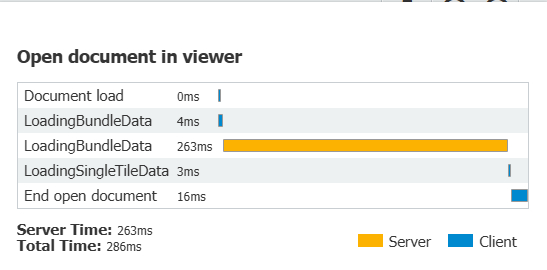
Diagnostics mode is a feature of the web client that can be useful in identifying the source of latency problems. Once enabled, it will display a graph after every transaction that identifies the time the web browser spent waiting for a response from the server, and the time the web browser spent processing information received from the server.
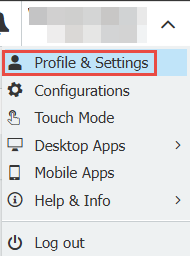
Step 1: Click on the dropdown arrow next to your docuware username and click Settings.
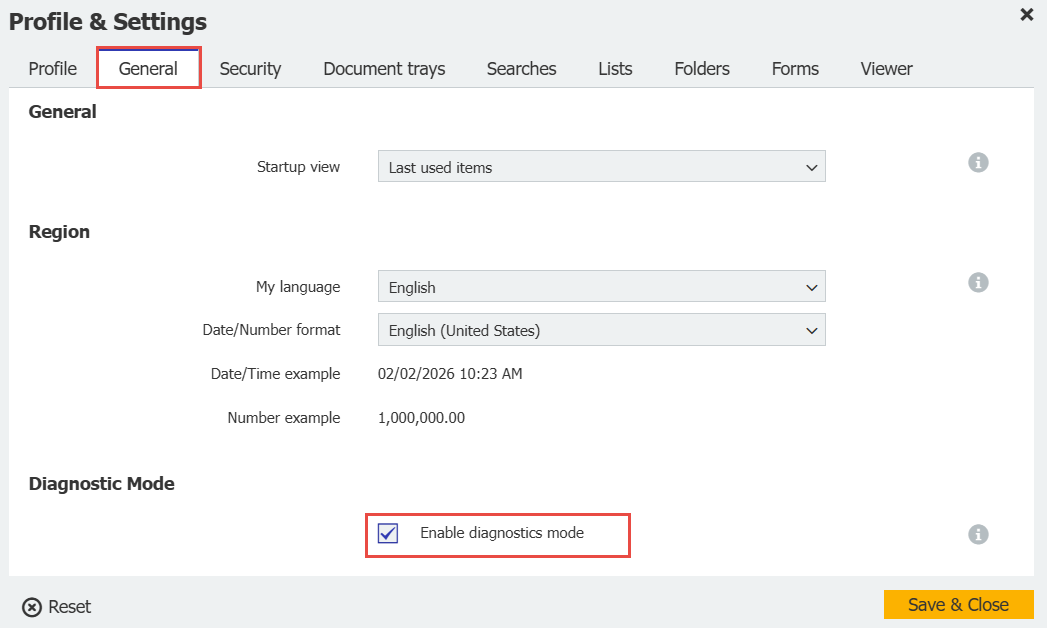
Step 2. Open the General tab and click on the tick box Enable diagnostics mode, then click Save & Close.
Step 3: After running a query or opening a document, you will see a graph that breaks down that operation into smaller tasks and identifies how much time was spent between the server and the web client to perform those tasks.
KBA is applicable to both Cloud and On-premise organizations.
Views:
This article is valid for DocuWare versions: 7.0, 7.1, 7.2, 7.3, 7.4, 7.5, 7.6, 7.7, 7.8, 7.9, 7.10, 7.11, 7.12, 7.13, 7.14, diagnostics mode web client performance latency slow #FAQID_4936