


Be careful! If you reset the Modelspace then all trained data will be deleted and Intelligent Indexing will start learning from beginning.
This article is only for DocuWare on-premises systems in combination with Intelligent Indexing on-premises. Please open a Support Request if you want to reset the Modelspace of a DocuWare Cloud System.
Question:
How to reset the Intelligent Indexing Modelspace on-premises?
Solution:
Please follow the below steps to reset the Intelligent Indexing Modelspace on-premises:
- Please open the Intelligent Indexing web interface using a web browser.
This link depends on the installation. These are examples by default:
http://<servername>/IntelligentIndexing
http://localhost/intelligentindexing
- Log in with the credentials.
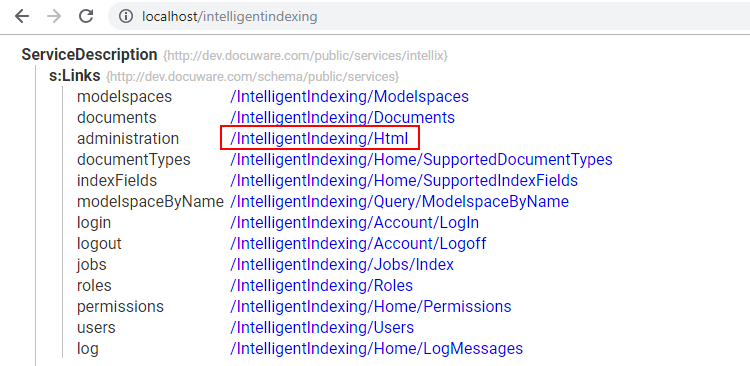
- After you logged in please click on on "/IntelligentIndexing/Html"
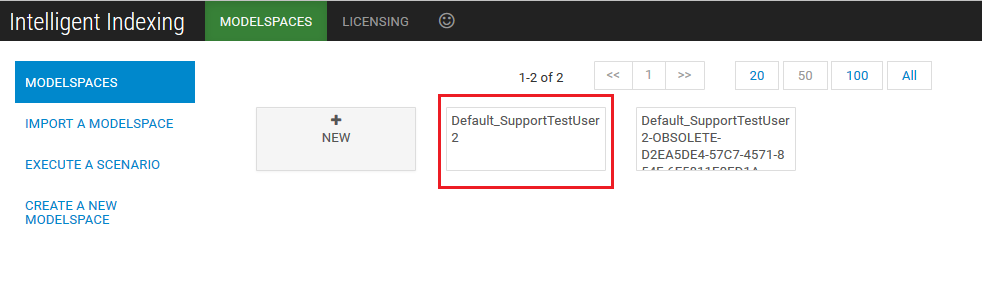
- Click on the default Modelspace. You can see the used Modelspace in the web-configuration under "Intelligent Indexing".
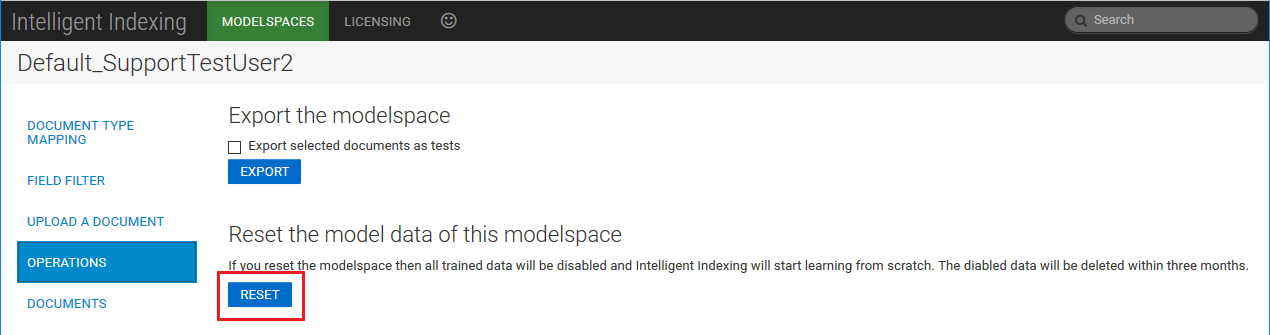
- You can then reset the Modelspace using the menu item "Operations". Click "Reset" under "Reset the model data of this Modelspace".
KBA is applicable to On-premise Organizations ONLY.