


Behavior:
You have an Export job that runs via Task Scheduler, and another account is set to run it. You noticed that when running on a schedule, it never generates a CSV file. The Export job will work if it's run from the Export tool or scheduled task is ran manually.
Solution:
If you are experiencing issues with Scheduled Tasks and having a different user to run them, please conduct the following steps:
-
Log in to Windows with the account you wish to run the Scheduled Task with.
-
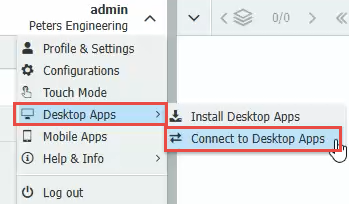
Establish a connection to the Desktop Apps from the Web Client.
-
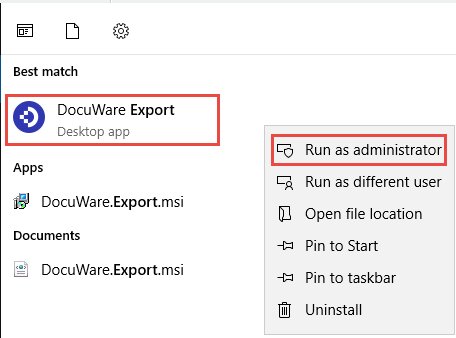
Start the Export tool by right clicking the application and selecting Run as Administrator.
-
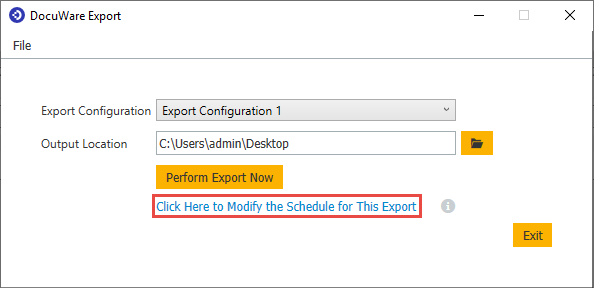
Select the option Click Here to Modify the Schedule for This Export.
-
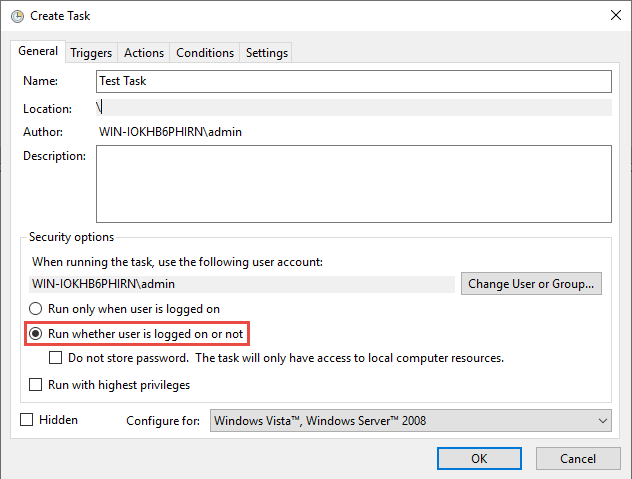
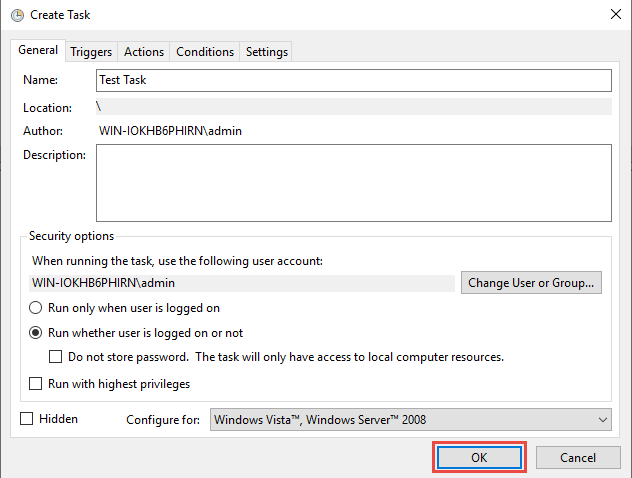
Create a task in Task Scheduler and select the option Run whether user is logged on or not.
-
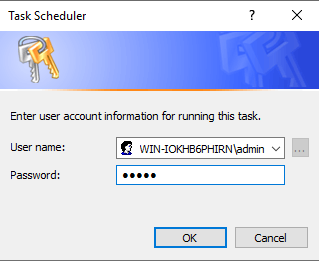
When you select this option and click OK to save the scheduled task, you will be prompted to enter your credentials.
Once you have completed these steps, you can now log into Windows with another account, and you'll find that the Scheduled Task will now run and generate the CSV file.
KBA is applicable for both Cloud and On-premise Organizations.