


Behavior:
When attempting to display DWG format files in the Viewer you come across the following error:
ERROR: "Imaging operation has failed due to time-out"
Solution:
To resolve this for On-Premises systems, browse to the following path: C:\Program Files (x86)\DocuWare\Common\Imaging and open DocuWare.Imaging.Worker.exe.config file in a text editor.
Search for “appSettings” within the file, and add a new line below it. Insert <add key="AnyDwgOptions" value="_Recover_OutLayout Active" /> in the new line.
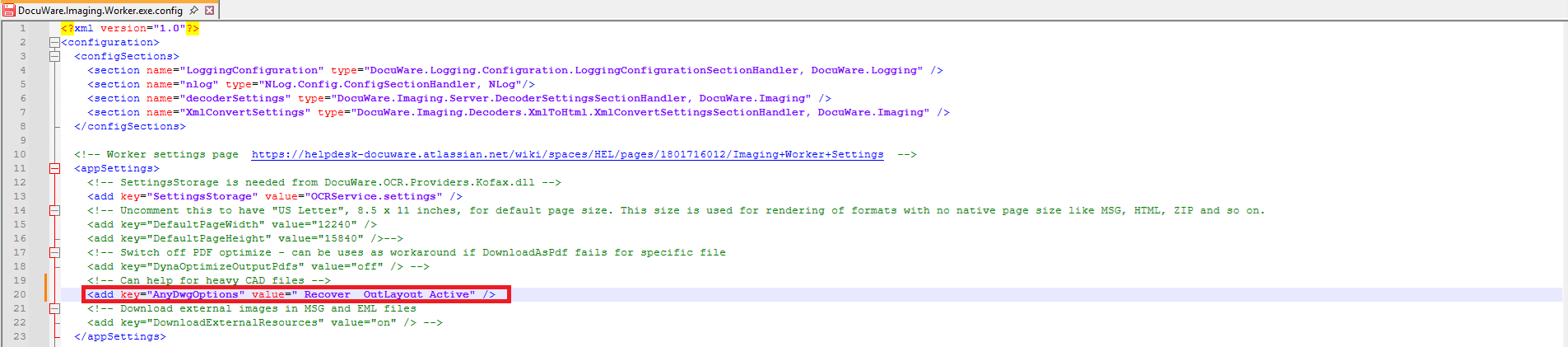
In the Taskmanager stop all DocuWare Imaging Worker processes and save the changes in the config file. Empty browser cache and check if documents are displayed correctly. If not, you then have to re-import the documents.
Note: The timeout is likely caused by the complexity of the file, leading to longer rendering times.
KBA applicable to On-Premises Organizations ONLY!