


Behavior:
When attempting to open the Organization Settings plugin, you encounter the following error.
ERROR: "There was a problem loading the Organization Settings. Authentication error. Please contact your DocuWare Administrator."
Solution:
To resolve the error, implement the following steps:
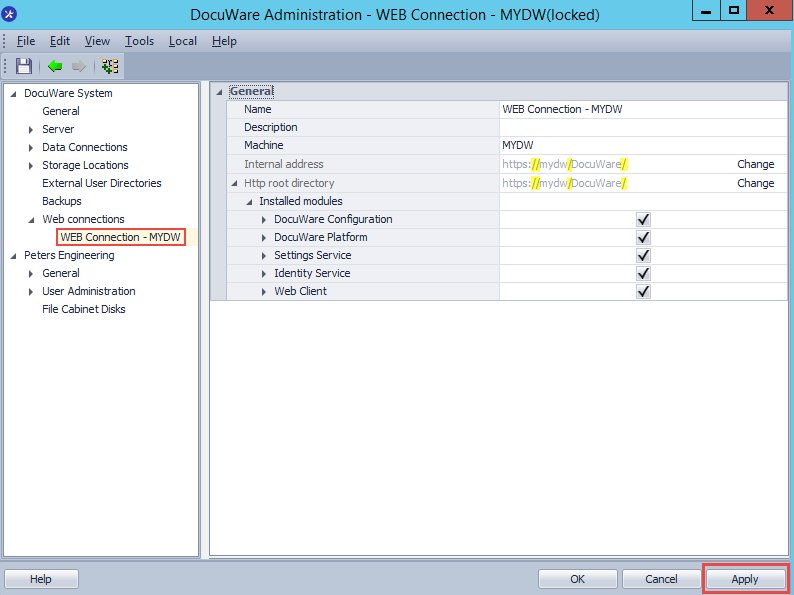
1. Open DocuWare Administration and verify that the Web Connection(s) have the forward slash added to the end of the URL, as shown in the screenshot below. Once you have made your changes, click Apply to save your changes.
2. Next, navigate to file path C:\ProgramData\DocuWare\ServerConfig where you will find a file named dwmachine.config.
NOTE: Please take a backup of the dwmachine.config prior to making any changes.
3. For DocuWare versions 7.10 and below, open the dwmachine.config file and locate the values LocalWebService and AuthorityAddress. These values must contain the forward slash character at the end of the URLs. If not, update them as shown in the screenshot below:

For DocuWare version 7.11 and higher the AuthorityAddress URL needs to be adjusted as well.

After saving the changes made, you will now be able to open the Organizations Settings plugin without error.
KBA applicable to On-Premises Organizations ONLY!