


Behavior:
When accessing the Document Processing module on a load-balanced DocuWare system, the page fails to load and you receive the following error:
ERROR: "Session is not registered"
Solution:
This error is due to messages sent over the load balancer and not reaching the other server(s).
In order to fix this issue, you must adjust the DocCap files to send the messages over your Fully Qualified Domain Name:
- Navigate to C:\Program Files\DocuWare\Web\DocCap (may also be located at C:\Program Files(86)\DocuWare\Web\DocCap and make a copy of the Web.config file.
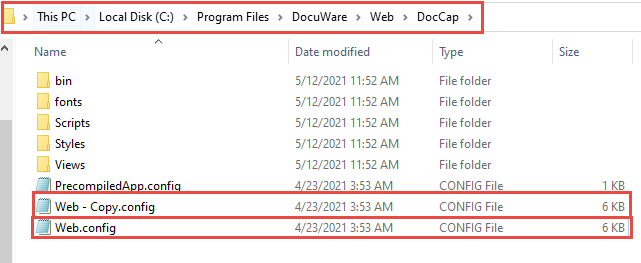
- Open the original file and enter the following lines into the <appSettings> tag:
<add key="SettingsServiceUrl" value="https://[FQDN]/DocuWare/Settings" /><add key="PlatformServiceUrl" value="https://[FQDN]/DocuWare/Platform" />
NOTE: FQDN refers to your Fully Qualified Domain Name. -
Additionally, the value of "UrlProviderType" must be changed to "StaticUrlProvider".
-
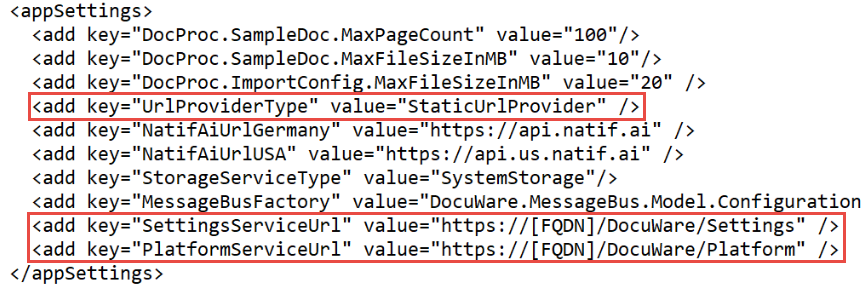
The result should look like the following:
<appSettings>
<add key="DocProc.SampleDoc.MaxPageCount" value="100"/>
<add key="DocProc.SampleDoc.MaxFileSizeInMB" value="10"/>
<add key="DocProc.ImportConfig.MaxFileSizeInMB" value="20" />
<add key="UrlProviderType" value="StaticUrlProvider" />
<add key="NatifAiUrlGermany" value="https://api.natif.ai" />
<add key="NatifAiUrlUSA" value="https://api.us.natif.ai" />
<add key="StorageServiceType" value="SystemStorage"/>
<add key="MessageBusFactory" value="DocuWare.MessageBus.Model.Configuration.DefaultHyperBusFactory, DocuWare.MessageBus.Model.Provider" /><!--Chooses which HyerBusFactory to load in configurator (onprem/cloud); For OnPrem all config sections regarding HyperBusFactory needs to be preserved.-->
<add key="SettingsServiceUrl" value="https://[FQDN]/DocuWare/Settings" />
<add key="PlatformServiceUrl" value="https://[FQDN]/DocuWare/Platform" />
</appSettings>
-
Once all the following steps have been completed, perform an IISRESET. Accessing the Document Processing module should now be successful without error.
Not sure how to reset IIS? Follow KBA-34532 on how to properly reset IIS.
KBA is applicable for On-premise Organizations ONLY!